

Automating Spec and Test Resource Updates in AI-Driven Development
As AI-driven development accelerates, keeping specifications and test documents in sync becomes increasingly difficult. We introduce the development ecosystem Katatan has built to automate this process using GitHub.
Spec Maintenance: The Hidden Cost of AI-Driven Development
AI-driven development is accelerating daily. But as development speed increases, a growing pain point emerges: keeping functional specifications and test specifications up to date.
Why is specification maintenance so difficult? AI agent execution plans (Plans) are optimized for completing development tasks — not for serving as master specification documents. Using them as-is for product specs is impractical.
What about writing specifications directly into the master spec document during Plan execution? While this allows real-time alignment on spec clarity, it creates ambiguity for AI agents about development scope, which can degrade both efficiency and quality. The risk of conflicting edits from other team members is another concern that shouldn't be overlooked.
Wanting to adopt AI-driven or spec-driven development, but having nowhere clean to store your specifications — this is a problem worth solving early. Document AI summarization services like NotebookLM can help, but maintaining freshness — adding new specs while removing outdated ones — turns into a surprisingly painful process.
Katatan's AI-Driven Development Ecosystem
Katatan has developed a development ecosystem purpose-built for AI-driven workflows. By combining Katatan and GitHub, you can create a surprisingly simple yet powerful system that keeps specifications, test resources, and code in sync automatically.
This workflow automatically keeps spec documents and test environments up to date while preserving the semantic coherence of your development environment. All you need is a modern IDE with AI agent support, GitHub, and Katatan.
How the Workflow Operates
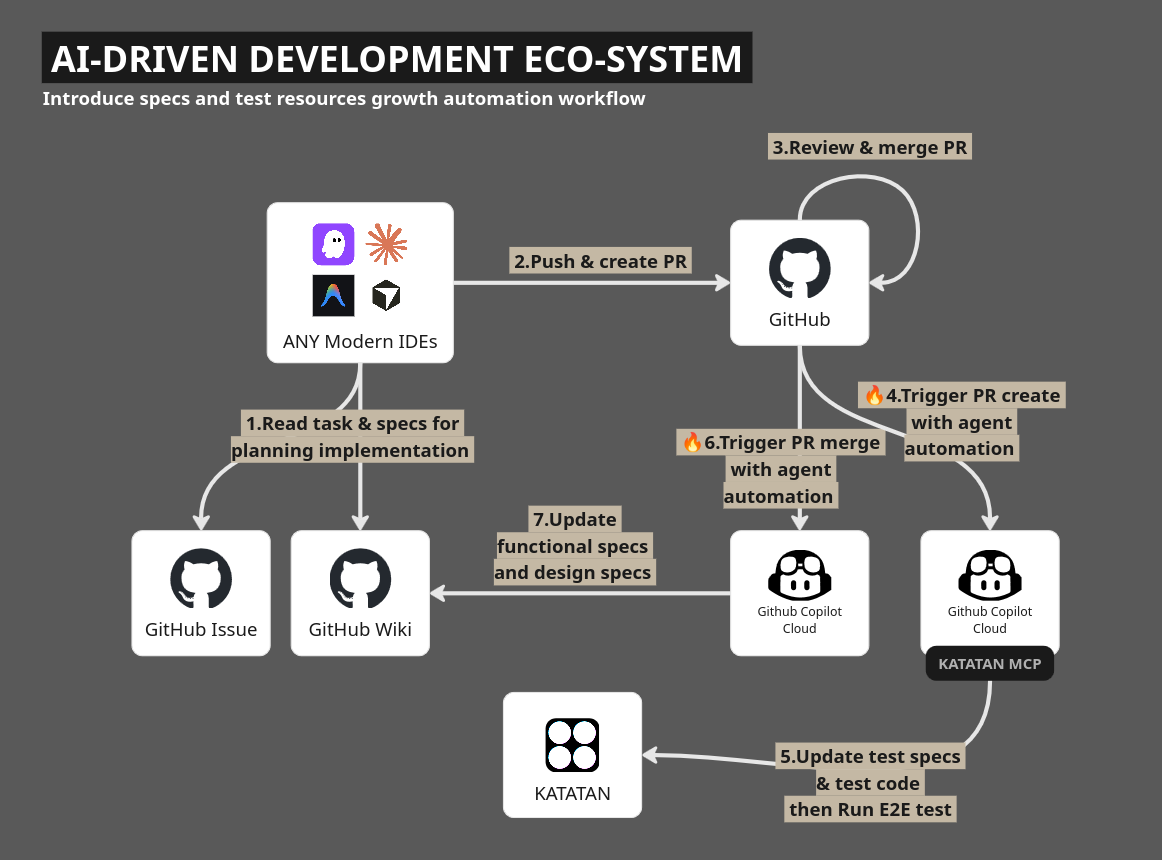
Step 1. Read issues & specs from GitHub for planning implementation
Brief your AI agent on task requirements and kick off the Plan. The agent will produce a task plan including implementation specifications. While this plan is optimized for execution rather than documentation, it's an essential resource for improving implementation quality.
Step 2. Push & create PR
Once implementation and verification are complete, push your commits to GitHub and open a pull request. Here's a critical point: the pull request serves as a handover document for spec updates. Write it clearly enough that anyone reading it can understand how the implemented feature works and what its specifications are.
Step 3. Review & merge PR
Once the team review passes, merge the pull request. But before merging, one setup step is required.
GitHub offers Cloud Automation — a mechanism to trigger Copilot Cloud Agents on events like PR merges. Set up these event hooks in GitHub in advance. You only need to configure two:
- PR creation event: An Automation that updates test specifications
- PR merge event: An Automation that updates functional and design specifications
Details on each are covered in the steps below.
Step 4. Trigger PR create with agent automation
This GitHub Cloud Automation fires on PR creation events. Cloud Agents support MCP configuration — add the Katatan MCP settings to your Cloud Agent's MCP configuration.
Store your Katatan MCP access token in GitHub Secrets and reference it from the Agent MCP configuration. Secret names must begin with the COPILOT_MCP_ prefix. See the GitHub official documentation for details.
Notably, Katatan MCP access tokens are owned by the project, not individual accounts — they aren't affected by developer transfers or departures, which is a significant advantage for team operations.
Step 5. Update test specs & test code then run E2E test with Katatan
The Copilot Cloud Agent follows your Automation prompt to update E2E tests. Since Playwright can also run within the Automation, test execution and result recording can be fully automated end-to-end.
Step 6. Trigger PR merge with agent automation
When a pull request is merged, the Cloud Agent responsible for spec updates is triggered. Include instructions in your Automation prompt to update the GitHub Wiki.
GitHub Wiki pages are written in Markdown and can be cloned locally — making it an ideal knowledge base for AI agents. The key to maintaining a healthy Wiki is keeping pages small and organized by feature. Naming pages after their feature makes them easier for AI agents to search and helps reduce token and context cache usage.
Step 7. Update functional specs and design specs on GitHub
The GitHub Wiki is updated: missing pages are created, and outdated information is replaced with current content. Because pull requests work for Wikis too, reviewing diffs and catching conflicts is straightforward.
Once the Wiki update is complete, have team members pull the changes to sync the latest knowledge to their local environments — keeping a clean, AI-friendly workspace for everyone.
That's one full cycle of the workflow. Each time you start a new task, repeating Steps 1 through 7 keeps features, specifications, and test cases in sync automatically.
Closing
We hope this article has been useful. If you run into any challenges setting up this workflow, feel free to reach out to Katatan. We welcome feedback from anyone who tries implementing it based on this guide.
Contact: contact@katatan.com